No-Code and Low-Code Development in 2026: Build Apps Without Writing a Single Line of Code
AI Search & Quick Summary
Key Takeaway: The complete guide to no-code and low-code development in 2026. Discover top platforms like Bubble, Webflow, Framer, and Zapier, learn when to use no-code vs traditional coding, and see real success stories of businesses built without writing code.
The No-Code Revolution: Why 2026 Is the Year Everyone Becomes a Builder
A decade ago, building a web application required months of development time, a team of experienced engineers, and a budget of $50,000 or more. Today, a solo entrepreneur with zero coding experience can launch a fully functional SaaS product, marketplace, or business automation system in a matter of weeks — sometimes days — using no-code and low-code platforms.
This is not a fringe trend. The no-code and low-code market is projected to reach $187 billion by 2030, growing at a compound annual growth rate of over 30%. Gartner predicts that by 2027, 70% of new applications developed by enterprises will use no-code or low-code technologies. The movement is reshaping how businesses of all sizes approach software development, democratizing the ability to build digital solutions and putting that power in the hands of people closest to the problems they are solving.
This comprehensive guide explores everything you need to know about no-code and low-code development in 2026 — from understanding the fundamental differences between the two approaches to evaluating the top platforms, examining real-world use cases, understanding the limitations, and deciding when to use no-code versus traditional programming for your project.
What Is No-Code vs. Low-Code? Understanding the Difference
No-Code Platforms
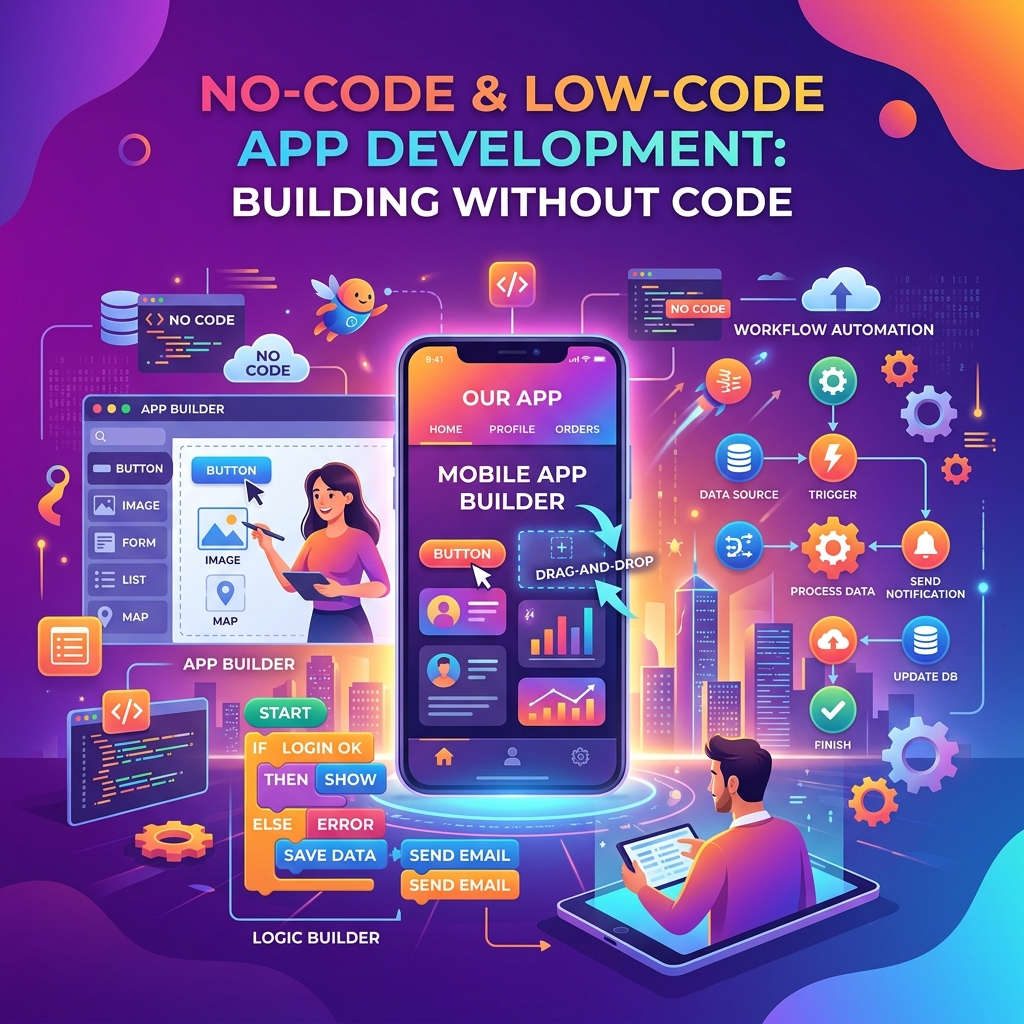
No-code platforms provide visual, drag-and-drop interfaces that allow users to build applications without writing any code whatsoever. Everything — from the user interface to the database schema to the business logic — is configured through visual editors, dropdown menus, and pre-built components.
No-code platforms are designed for non-technical users: business owners, marketers, operations managers, and entrepreneurs who have deep domain expertise but no programming background. The learning curve is measured in days or weeks rather than months or years.
Low-Code Platforms
Low-code platforms also provide visual development tools, but they allow (and sometimes require) custom code for advanced functionality. They accelerate development for professional developers by handling the boilerplate — authentication, database connections, API integrations — while allowing custom logic where needed.
Think of it this way: no-code is like using a smartphone camera — point and shoot. Low-code is like using a professional camera with automatic settings — you can let the camera handle most decisions, but you can switch to manual when you need precise control.
Market Growth and Industry Statistics
The numbers behind the no-code and low-code movement are staggering and continue to accelerate:
- $187 billion projected market size by 2030 (up from $27 billion in 2023)
- 70% of enterprise applications will be built on no-code/low-code platforms by 2027 (Gartner)
- 4.4x faster development speed compared to traditional coding for standard business applications
- 74% reduction in development costs for typical internal business tools
- Over 500 million digital apps need to be built by 2030 — traditional development alone cannot meet this demand
- The developer shortage: There are approximately 28 million software developers worldwide, but demand exceeds supply by 40%. No-code platforms help bridge this gap by enabling "citizen developers" — business users who build their own solutions.
Top No-Code and Low-Code Platforms in 2026
Bubble — The Full-Stack No-Code Powerhouse
Bubble is the most powerful no-code platform for building complex web applications. It provides a visual editor for designing interfaces, a workflow system for business logic, a built-in database, user authentication, API integrations, and responsive design capabilities.
Best for: Marketplaces, SaaS products, CRM systems, social platforms, directory sites.
Pricing: Free tier available. Paid plans start at $29/month for personal projects and $119/month for professional applications.
Notable apps built with Bubble: Qoins (fintech app acquired), Dividend Finance (raised $200M+), numerous marketplace startups that later transitioned to custom code after validating their business models.
Webflow — The Design-First Website Builder
Webflow combines the visual design freedom of tools like Figma with the publishing capabilities of a CMS. It generates clean, semantic HTML, CSS, and JavaScript — producing websites that perform as well as hand-coded sites. Webflow excels at marketing sites, portfolios, blogs, and ecommerce stores.
Best for: Marketing websites, portfolios, blogs, small ecommerce stores, agency client sites.
Pricing: Free tier for 2 projects. Site plans start at $14/month. Ecommerce plans from $29/month.
Framer — The Modern Website Builder
Framer has emerged as a serious Webflow competitor, offering an incredibly intuitive interface with built-in animations, interactions, and a component-based architecture. In 2026, Framer has become the go-to choice for designers and startups who want visually stunning, high-performance websites without writing code.
Best for: Startup landing pages, portfolio sites, marketing sites, SaaS marketing pages.
Pricing: Free tier available. Pro plans from $15/month.
Airtable — The Spreadsheet-Database Hybrid
Airtable takes the familiar spreadsheet interface and adds the power of a relational database. It supports linked records, attachment fields, rich text, formulas, and integrations with hundreds of other tools. Teams use it for everything from project management to inventory tracking to editorial calendars.
Best for: Project management, content calendars, inventory tracking, CRM, event planning, research databases.
Pricing: Free tier for small teams. Team plans from $20/user/month.
Zapier — The Automation Glue
Zapier connects over 7,000 apps and automates workflows between them without code. When something happens in one app (a trigger), Zapier automatically performs actions in other apps. For example: when a new form submission arrives in Typeform, Zapier can add the contact to your CRM, send a welcome email through Mailchimp, and create a task in Asana — all automatically.
Best for: Workflow automation, data synchronization between apps, automated notifications, lead processing.
Pricing: Free tier with 100 tasks/month. Starter plans from $19.99/month.
Make (formerly Integromat) — Advanced Visual Automation
Make is Zapier's more powerful (and more complex) competitor. It uses a visual canvas where you design automation workflows as flowcharts, with branching logic, error handling, and data transformation capabilities that go far beyond Zapier's linear approach.
Best for: Complex multi-step automations, data transformation workflows, API orchestration, batch processing.
Pricing: Free tier with 1,000 operations/month. Core plans from $9/month.
Glide — Mobile Apps from Spreadsheets
Glide turns Google Sheets and Airtable data into beautiful mobile and web applications. It is remarkably simple — if you can build a spreadsheet, you can build a Glide app. The platform handles the user interface, authentication, and data management automatically.
Best for: Internal company apps, field service apps, directory apps, simple customer-facing tools, inventory management.
Pricing: Free tier available. Business plans from $60/month.
Retool and Appsmith — Internal Tool Builders
These low-code platforms are specifically designed for building internal business tools — admin panels, dashboards, data management interfaces, and operations tools. They connect directly to your databases and APIs, providing drag-and-drop UI components that your team can use immediately.
Best for: Admin dashboards, internal CRUD tools, data visualization, operations management, customer support tools.
Real-World Use Cases
Startups Validating Ideas
The most powerful use case for no-code is rapid idea validation. Instead of spending $50,000 and 6 months building a custom application, founders can build a functional MVP in 2-4 weeks using Bubble or Webflow + Airtable + Zapier. If the idea gains traction, they can continue scaling on no-code or transition to custom development with validated market demand.
Internal Business Tools
Every company has processes that run on spreadsheets, email chains, and manual data entry. No-code platforms allow operations teams to build custom tools — approval workflows, inventory trackers, employee directories, onboarding systems — in days instead of waiting months in the IT development queue.
Marketing and Sales Automation
Marketing teams use no-code tools to build landing pages (Webflow/Framer), automate lead nurturing (Zapier + email tools), create content management workflows (Airtable), and build custom dashboards that aggregate data from multiple marketing platforms.
Client Portals and Customer-Facing Apps
Service businesses build client portals using no-code tools — where customers can view project status, upload documents, communicate with their team, and access deliverables. These portals replace scattered email threads with organized, professional experiences.
Education and Non-Profits
Educational institutions use no-code to build student management systems, event registration platforms, and resource libraries. Non-profits build donor management systems, volunteer coordination tools, and impact reporting dashboards — all without the budget for custom software development.
Limitations of No-Code: When You Hit the Wall
No-code is powerful, but it is not suitable for everything. Understanding the limitations helps you make informed decisions about when to use it and when traditional development is the better choice.
Performance Limitations
No-code platforms add an abstraction layer that can impact performance. Applications built on Bubble, for example, may load more slowly than custom-coded equivalents. For consumer-facing products that require sub-100ms response times or handle millions of concurrent users, custom development typically provides better performance.
Customization Ceilings
Every no-code platform has boundaries. You can build 80-90% of what you envision, but that remaining 10-20% — a unique interaction pattern, a complex algorithm, a specific integration — may be impossible or extremely difficult without custom code. This is where low-code platforms offer an advantage over pure no-code.
Vendor Lock-In
Your Bubble application cannot be exported as source code and deployed on your own servers. If Bubble changes their pricing, has downtime, or shuts down, your application is at risk. This vendor dependency is one of the most significant trade-offs of no-code development. Webflow mitigates this somewhat by allowing you to export clean HTML/CSS, but most no-code platforms do not offer this.
Scalability Concerns
While no-code platforms have improved significantly, scaling to hundreds of thousands of users or handling complex real-time data processing can push these platforms to their limits. Most successful no-code startups eventually transition to custom code once they reach significant scale — but by that point, they have revenue to fund the transition.
Complex Business Logic
If your application requires complex algorithms, machine learning models, real-time data processing, or intricate permission systems, no-code tools may struggle. Low-code platforms handle some of this better, but truly complex logic still benefits from traditional programming.
No-Code vs. Traditional Coding: A Cost Comparison
Understanding the cost differences helps business owners make pragmatic decisions:
- Simple marketing website: No-code (Webflow/Framer): $200-500 total. Traditional: $3,000-10,000 for a developer.
- MVP web application: No-code (Bubble): $500-2,000 + 2-4 weeks of your time. Traditional: $20,000-80,000 + 3-6 months.
- Internal business tool: No-code (Retool/Glide): $100-500/month. Traditional: $10,000-30,000 custom build.
- Complex SaaS product at scale: No-code: $200-500/month platform fees but hits limitations. Traditional: $100,000-500,000+ but offers unlimited customization and performance.
The pattern is clear: for validation, internal tools, and small-to-medium applications, no-code offers 80-95% cost savings. For large-scale, performance-critical, or highly customized products, traditional development justifies its higher cost.
Case Studies: No-Code Success Stories
Case Study 1: Comet — $14M Revenue on Bubble
Comet, a French freelancer marketplace, built their entire platform on Bubble. The company grew to $14 million in annual revenue before transitioning parts of their stack to custom code. Their story demonstrates that no-code can take you far beyond the MVP stage — it can power a real, revenue-generating business.
Case Study 2: Plato — From Spreadsheet to Funded Startup
Plato started as an Airtable database connected to a simple Webflow site via Zapier. They used this no-code stack to validate their mentorship marketplace concept. After demonstrating product-market fit with real users and revenue, they raised $13.4 million in funding and hired engineers to rebuild on custom infrastructure.
Case Study 3: Internal Tools at Enterprise Scale
A Fortune 500 retail company used Retool to build 47 internal tools in 12 months — tools that had been sitting in the IT backlog for 2+ years. The operations team built inventory management dashboards, customer service interfaces, and store performance trackers without waiting for engineering resources. Estimated savings: $2.3 million in development costs.
Future Predictions for No-Code and Low-Code in 2026 and Beyond
- AI-powered generation: Platforms are increasingly using AI to generate applications from natural language descriptions. In 2026, you can describe what you want in plain English and get a functional first draft. This trend will accelerate dramatically.
- Convergence with traditional development: The line between no-code and traditional code is blurring. Developers increasingly use no-code tools for rapid prototyping and non-critical features, while no-code platforms add more extensibility through custom code blocks.
- Industry-specific solutions: Expect more no-code platforms purpose-built for specific industries — healthcare patient management, real estate CRM, restaurant ordering systems — with compliance and domain knowledge built in.
- Better performance: No-code platforms are investing heavily in performance optimization. Compiled no-code applications will eventually approach the performance of hand-coded solutions for most use cases.
- Enterprise adoption: Large enterprises are moving beyond experimentation. Dedicated "citizen developer" programs with governance frameworks are becoming standard practice in Fortune 500 companies.
Frequently Asked Questions
Can I build a real business using only no-code tools?
Absolutely. Companies like Comet ($14M revenue on Bubble), Teal (career platform on Bubble that raised $11M), and numerous ecommerce businesses running on Webflow demonstrate that no-code can power real, profitable businesses. The key is choosing the right platform for your use case and understanding the scalability limitations. Many businesses operate successfully on no-code indefinitely, while others use it to validate and grow before transitioning to custom code.
Is no-code going to replace traditional developers?
No. No-code will not replace developers — it will change what developers work on. As no-code handles more routine application development, professional developers will focus on complex systems, infrastructure, AI/ML, and the platforms themselves. The total demand for software far exceeds what developers alone can build, so no-code expands the overall capacity rather than replacing existing workers. Developers who learn to leverage no-code tools alongside traditional coding will be the most valuable professionals in the market.
Which no-code platform should I start with as a complete beginner?
It depends on what you want to build. For a website or landing page, start with Framer or Webflow — both have excellent tutorials and you can publish a professional site in a single weekend. For a web application (marketplace, CRM, SaaS), start with Bubble — it has the steepest learning curve among no-code tools but offers the most power. For automations, start with Zapier — it is the simplest to understand and you will see immediate results. For an internal tool or database, start with Airtable or Glide.
How long does it take to learn no-code development?
For simple tools like Zapier, Airtable, and Glide, you can be productive within a few hours to a day. For website builders like Webflow and Framer, expect 1-2 weeks to build a professional-quality site. For complex application builders like Bubble, plan for 4-8 weeks of dedicated learning before you can build production-ready applications. The learning curve is dramatically shorter than traditional programming (which typically requires 6-12 months to become productive), but it is not zero.
What happens if my no-code platform shuts down?
This is a legitimate risk. Mitigate it by choosing established, well-funded platforms with large user bases. Webflow is backed by $334M in funding. Bubble has raised $106M. Airtable has raised $1.4B. Additionally, maintain regular exports of your data, document your workflows and business logic independently of the platform, and avoid building mission-critical systems on platforms with uncertain futures. For critical applications, consider low-code platforms that allow you to export source code.
Conclusion
No-code and low-code development in 2026 is not a fad — it is a fundamental shift in how software gets built. The tools have matured beyond toy projects into platforms capable of powering real businesses, automating complex workflows, and enabling non-technical teams to solve their own problems without waiting in IT backlogs.
Whether you are an entrepreneur validating a startup idea, a business owner looking to automate operations, or a marketing team wanting to move faster, there is a no-code tool that fits your needs and budget. Start small — pick one platform, complete a tutorial, and build something real this week. The best way to understand the power of no-code is to experience it firsthand. The barrier to building software has never been lower, and the opportunities have never been greater.

About the Author: Rahul Das
Tech Enthusiast, Software Developer, and Content Creator. Passionate about building scalable web applications and sharing practical knowledge to help students and professionals grow in their tech careers.
Related Articles
How to Convert PDF to Word Without Losing Formatting (100% Free)
Struggling with broken layouts? Learn the exact methods to convert PDF files to Word documents while perfectly preserving fonts, images, tables, and spacing.

Top 10 PDF Tools Every Student Needs in 2026: The Complete Guide
Discover the top 10 PDF tools every student needs in 2026 — from merging lecture notes to OCR scanning textbooks, with real use cases for every student type and all available free.
How to Merge PDF Files for Free in 2026: 5 Methods Compared
Compare five proven methods to merge PDF files for free in 2026 — browser-based tools, Adobe, Mac Preview, command line, and tips for password-protected files and batch merging.
Enjoyed this article?
Subscribe to our newsletter for more insights, tutorials, and industry updates delivered directly to your inbox.